MANAGING AND CREATING DISCOUNT COUPONS
INTRODUCTION
Welcome to another tutorial from the Keepsporting platform Brazil. This guide aims to show you how to create and manage discount coupons fully on the platform!
WHY GENERATE DISCOUNT COUPONS?
To reward individuals, teams, groups, and agencies for sharing your event across various platforms—a way of giving back to your audience!
GOLDEN TIP!
Don't make the mistake of eliminating registrations through manual spreadsheets or external forms. Have full control with the complete system that will manage your registrations with multiple features!
OBJECTIVE
Generate individual discount coupons for groups, teams, or agencies to sign up at a discounted price.
HOW TO ACCESS?
In the main menu of your event, click the “Discounts” button.
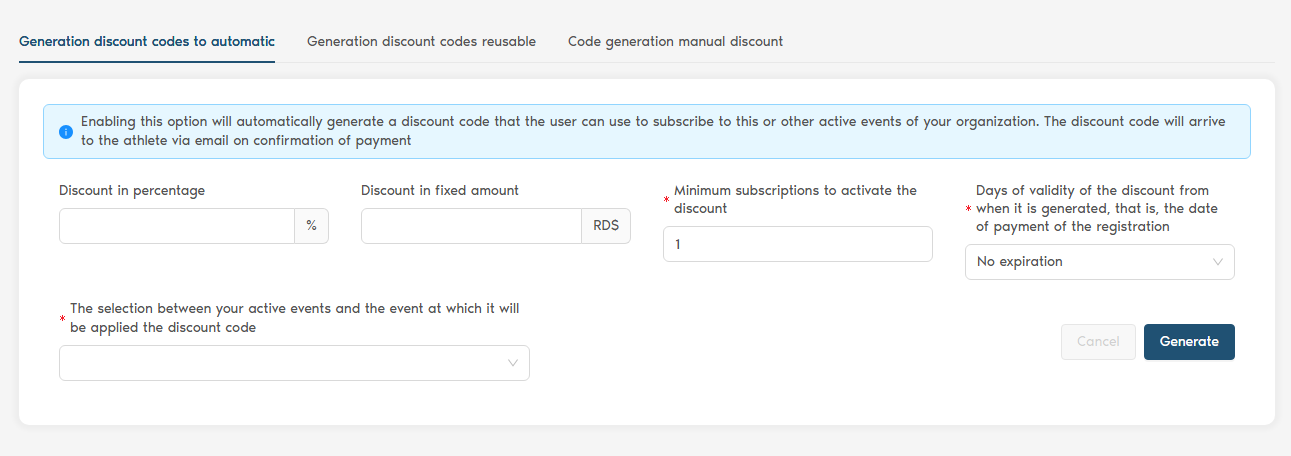
The screen to enter discount codes will appear as shown in the image above.
Here’s how it works!
PERCENTAGE DISCOUNT
Suppose your registration fee is R$ 60.00, and you want to offer a 50% discount for some athletes, bringing the final price to R$ 30.00. In the “Percentage Discount” field, enter the number “50” and the number of discount codes you wish to generate. Then click the “Generate” button. The data will be generated; simply copy the discount code and send it to the athlete, group, team, or agency.
Suppose your registration fee is R$ 60.00, and you want to offer R$ 10.00 off for athletes, bringing the final price to R$ 50.00. In the “Fixed Amount Discount” field, enter the number “10” and the number of discount codes you wish to generate. Then click the “Generate” button. The data will be generated; simply copy the discount code and send it to the athlete, group, team, or agency.
WHEN THE DISCOUNT CODE HAS BEEN USED
When the discount code is used, it will appear in green, and all the fields will be filled in as follows:
- Code
- Percentage
- Fixed Amount
- Used on
- Created on
Follow us on social media to stay updated on everything happening in the world of sports!
Facebook: Click here
Instagram: Click here
YouTube Channel: Click here
LinkedIn: Click here
Twitter: Click here
See you soon! ;-)